Higgsfield Genjutsu Tutorial: Character Motion Transfer in 2K
Turn a reference clip into a video starring your character. Create a character sheet in Higgsfield, transfer the motion with Genjutsu at 720p, then upscale your chosen result with Flux 3.0.
Guide by CoreUXReviewed
The reference. Your character.
Same movement. New character.
Watch the original beside the supplied 2K result, then follow the four steps below.
A man dances at a party beside gold chairs while guests stand behind him under colored lights. Original file: 1276 × 718, approximately 9.19 seconds, with audio.
The foreground dancer becomes Luis in sunglasses and black streetwear, following the reference movement in the party setting. Supplied result: 2560 × 1440, approximately 8.71 seconds, with audio.
Players have independent playback and audio controls. Reference: 9.19 seconds. Result: 8.71 seconds.
This guide contains affiliate links. CoreUX may earn a commission if you purchase through them.
The complete guide.
Follow the four steps below. Download the reference, create your character sheet, transfer the motion, and upscale the chosen result.
1. Download the reference video
Start with the movement you want to recreate. Download the reference clip below, watch it through, and identify the person you want to replace.
Save the source clip
In this example, replace the foreground dancer in the black shirt. Keep the surrounding guests, party setting, lighting, and camera movement as your reference. The comparison above shows the original and the supplied result; their durations differ slightly.
2. Create your character sheet in Higgsfield
Open Higgsfield’s image generator, attach a clear image of your character, and paste the JSON prompt below. Choose a landscape 3:2 output. Save the sheet once the identity and wardrobe stay consistent across the views.
Character-sheet prompt
Use your own character image as the attached reference. This is the supplied prompt, preserved for copying and downloading. It requests four full-body views on the left and three portraits on the right.
Character reference sheet JSON { "task": "generate_character_reference_sheet", "input": { "reference_image": "The attached reference image", "prompt": "Preserve the reference image's appearance and wardrobe." }, "instructions": { "identity": "Use the person in the reference image consistently across every view.", "appearance": "Preserve the reference image's appearance and wardrobe unless the input prompt requests changes.", "unseen_details": "Infer details not visible in the reference conservatively and keep them consistent across views." }, "output": { "type": "single_composite_image", "orientation": "landscape", "aspect_ratio": "3:2", "background": "plain seamless studio backdrop", "lighting": "soft, even, consistent across all views", "text_labels": false }, "layout": { "main_section": { "position": "left", "width_percent": 75, "arrangement": "four full-body views in one horizontal row", "alignment": "consistent head height, body scale, and ground line", "shots": [ { "id": "full_body_front", "order": 1, "view": "front", "framing": "entire body, including head and feet", "orientation": "facing directly toward camera" }, { "id": "full_body_profile", "order": 2, "view": "side profile", "framing": "entire body, including head and feet", "orientation": "turned 90 degrees from front, nose pointing toward image right" }, { "id": "full_body_back", "order": 3, "view": "rear", "framing": "entire body, including head and feet", "orientation": "turned 180 degrees from front, facing directly away from camera" }, { "id": "full_body_three_quarter", "order": 4, "view": "front three-quarter", "framing": "entire body, including head and feet", "orientation": "turned approximately 45 degrees from front, facing toward image right" } ] }, "detail_section": { "position": "right", "width_percent": 25, "arrangement": "three vertically stacked portrait panels", "alignment": "consistent head scale and comparable crop", "shots": [ { "id": "portrait_front", "order": 1, "view": "front", "framing": "head and shoulders", "orientation": "facing directly toward camera" }, { "id": "portrait_three_quarter", "order": 2, "view": "front three-quarter", "framing": "head and shoulders", "orientation": "turned approximately 45 degrees from front, nose pointing toward image right" }, { "id": "portrait_profile", "order": 3, "view": "side profile", "framing": "head and shoulders", "orientation": "turned 90 degrees from front, nose pointing toward image right" } ] } }, "pose_and_camera": { "full_body_pose": "standing upright, arms relaxed slightly away from torso, hands visible, feet comfortably apart", "expression": "neutral and consistent", "head_alignment": "head aligned with torso for each angle", "perspective": "natural proportions with minimal lens distortion", "camera_roll": "level", "full_body_camera_height": "approximately mid-torso", "portrait_camera_height": "eye level" }, "constraints": [ "Generate exactly four full-body views and three portraits.", "Show the same person in every shot.", "Keep each figure separate with no overlap.", "Do not crop the head, hands, or feet in full-body shots.", "Keep the entire hairstyle and chin visible in portraits.", "Maintain anatomical left and right consistently; do not mirror asymmetric details.", "Keep lighting, background, and rendering style consistent.", "Do not add text, labels, watermarks, or decorative elements." ] }Download the character-sheet promptThe character sheet used for this example
Luis’s supplied sheet shows the black jacket, hoodie, cargo pants, sunglasses, beard, and necklace from multiple angles. Check these details before moving to video. The example has hands in pockets, while the prompt asks for visible hands; for a new sheet, review that difference and regenerate if hand detail is important.
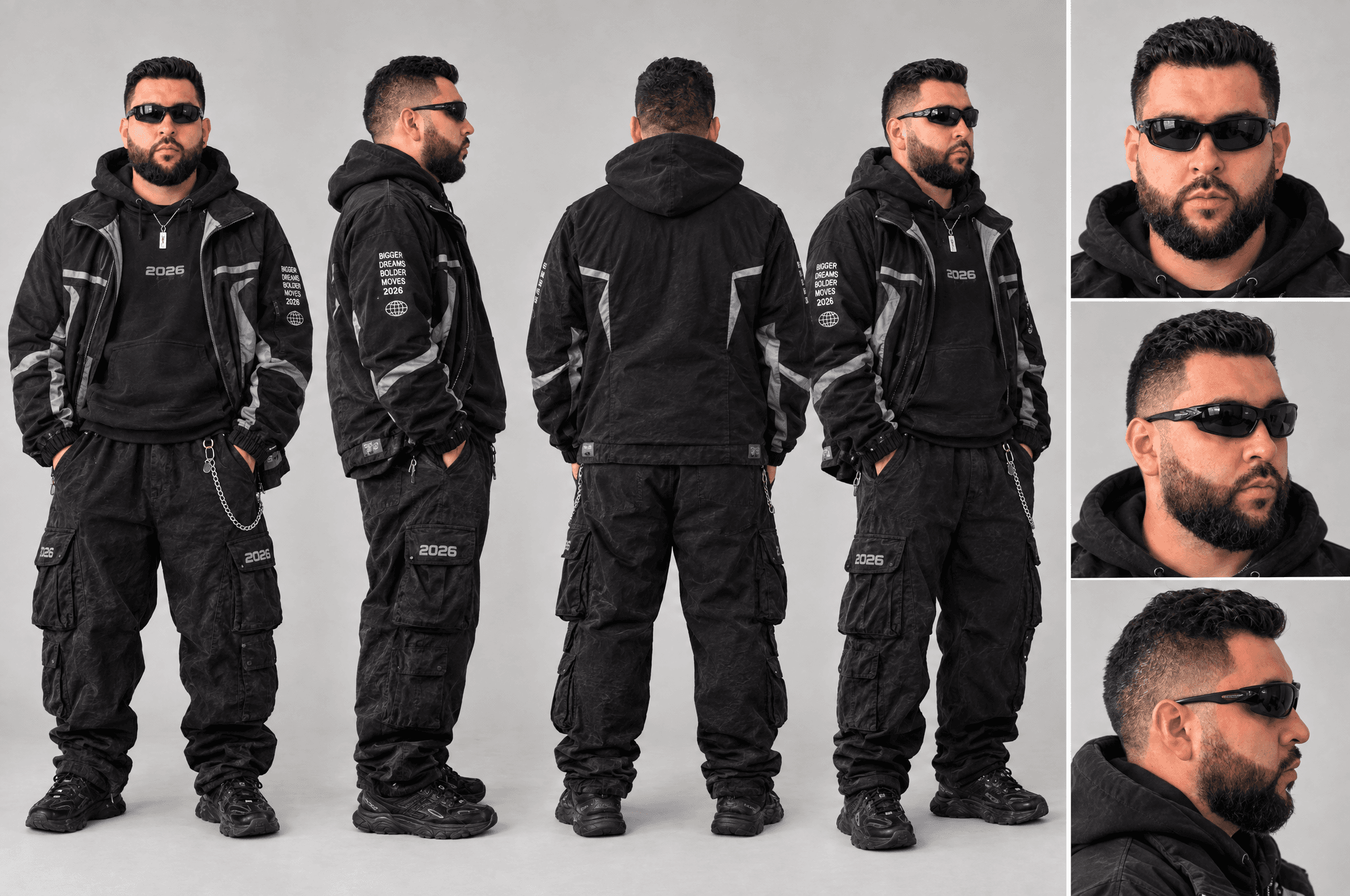
Luis Street Ware — supplied character sheet. Attach this as @image1 in the video step.
View full-size image — Luis Street Ware — supplied character sheet. Attach this as @image1 in the video step.3. Transfer the motion with Genjutsu at 720p
In Higgsfield, open Genjutsu and choose Motion Transfer. Add the source video and your character sheet. Generate at 720p to keep iteration costs down, then review the movement and identity before upscaling.
Attach the references
Link each mention to its matching uploaded attachment in Higgsfield.
Scroll sideways to see all columns.
Mention Attachment Purpose @video1 Reference dance video Movement, scene, and camera reference @image1 Finished character sheet Character identity and wardrobe Motion Transfer prompt
Use this suggested prompt for the example. It describes the intended edit; the original generation prompt was not supplied.
Suggested Genjutsu prompt Use @video1 as the motion and scene reference. Replace only the foreground dancer in the black shirt with the person in @image1. Preserve the character’s face, beard, sunglasses, black jacket, hoodie, cargo pants, and accessories. Follow the original dancer’s movement, timing, and body position. Keep the other guests, party setting, lighting, and camera movement consistent with the reference video.
Generate and review
Select 720p and match the source’s landscape framing. Review the full clip at normal speed, especially the face, hands, clothing, and people behind the dancer. Fix identity or motion problems here before paying to upscale. Credit usage depends on the current model settings and clip length; check the estimate shown before generating.
Scroll sideways to see all columns.
Setting Recommended for this workflow Feature Genjutsu — Motion Transfer Resolution 720p Framing Landscape, matching the source Inputs One reference video and one character sheet Review checklist
- The foreground dancer uses the character’s face, sunglasses, and wardrobe.
- Body movement follows the source without extra limbs or distracting warping.
- Guests, lighting, and camera movement remain coherent throughout the clip.
4. Upscale to 2K with Flux 3.0
Once the 720p version works, open Flux 3.0 Video Upscale in Higgsfield. Upload your chosen Genjutsu result, select 2K, and export the finished video.
Finish the chosen take
Upscaling comes after the creative review. It can improve detail, but a higher resolution will not fix incorrect movement or a drifting identity. The supplied finished example is 2560 × 1440, commonly labeled 2K or 1440p in this workflow. Its file dimensions are verified; the generation and upscale job settings were not supplied.
Sources and related guides
Higgsfield documents Genjutsu for motion transfer and lists Flux 3.0 Video Upscale in its creation hub. This guide follows the requested 720p-to-2K workflow using the supplied example files.
Review checklist
- Compare the upscale with the 720p version for facial and clothing detail.
- Check for flicker, halos, and changes to the character.
- Play the export through and confirm its audio and dimensions.
What you’re working toward.
A reusable character sheet and a motion-transfer video, reviewed at 720p before upscaling the chosen version to 2K.