The challenge of connecting field work and management
Construction work happens across job sites, people and dates. An owner needs to understand what is moving, what is blocked, who is scheduled and which expenses belong to each job. A crew member needs a practical way to document work while it is happening.
Those needs are related, but they call for different interfaces. A short field update needs to retain its project, author, work date and evidence. A management decision needs a clear view of the current record and its history. An AI assistant needs enough of that context to answer a useful question without turning an incomplete report into a confident conclusion.
We designed the system around those relationships. Projects, workers, workdays, purchases, reports and milestones each have a defined place. The interfaces give different people access to the parts of that system their work requires.
Three interfaces around one operational record
Telegram is the field interface. It guides people through recording plans, progress, problems and final results.
The dashboard is the management interface. It brings the resulting evidence together with schedules, costs, project status and decisions.
MCP, the Model Context Protocol, is the AI connection. It exposes selected information and supported actions to an authorized assistant, including ChatGPT or Codex.
Each interface serves a different moment in the work. The common foundation is the business record beneath them.
Projects · people · workdays · evidence · costs
Connections across the places work happens
The first layer is connectivity: making the relevant information reachable from the place someone is working.
Telegram for field reporting
The bot guides a crew member through choosing a project and actual work date, recording a plan, adding before photos, reporting progress or a blocker, and submitting a final result. That result can be Completed, Partial or Blocked.
Photos stay associated with the report they belong to. A late reply to an earlier photo prompt retains its original project and date, even if the person has since moved to another project in the conversation. Drafts and recovery paths help preserve work when an interaction is interrupted.
The bot also distinguishes submission from storage. A submission acknowledgment and the final Saved receipt describe different stages. That distinction matters when a report includes photos that still need to be stored and verified.
English and Spanish interfaces support the team across field and office workflows, while the original report wording remains part of the record.
The dashboard for operational oversight
The overview begins with projects that need attention and then shows recent published crew updates. Putting exceptions before the activity feed helps the owner choose which job to inspect first. Open blockers, publication problems and on-hold work appear alongside the latest available evidence.
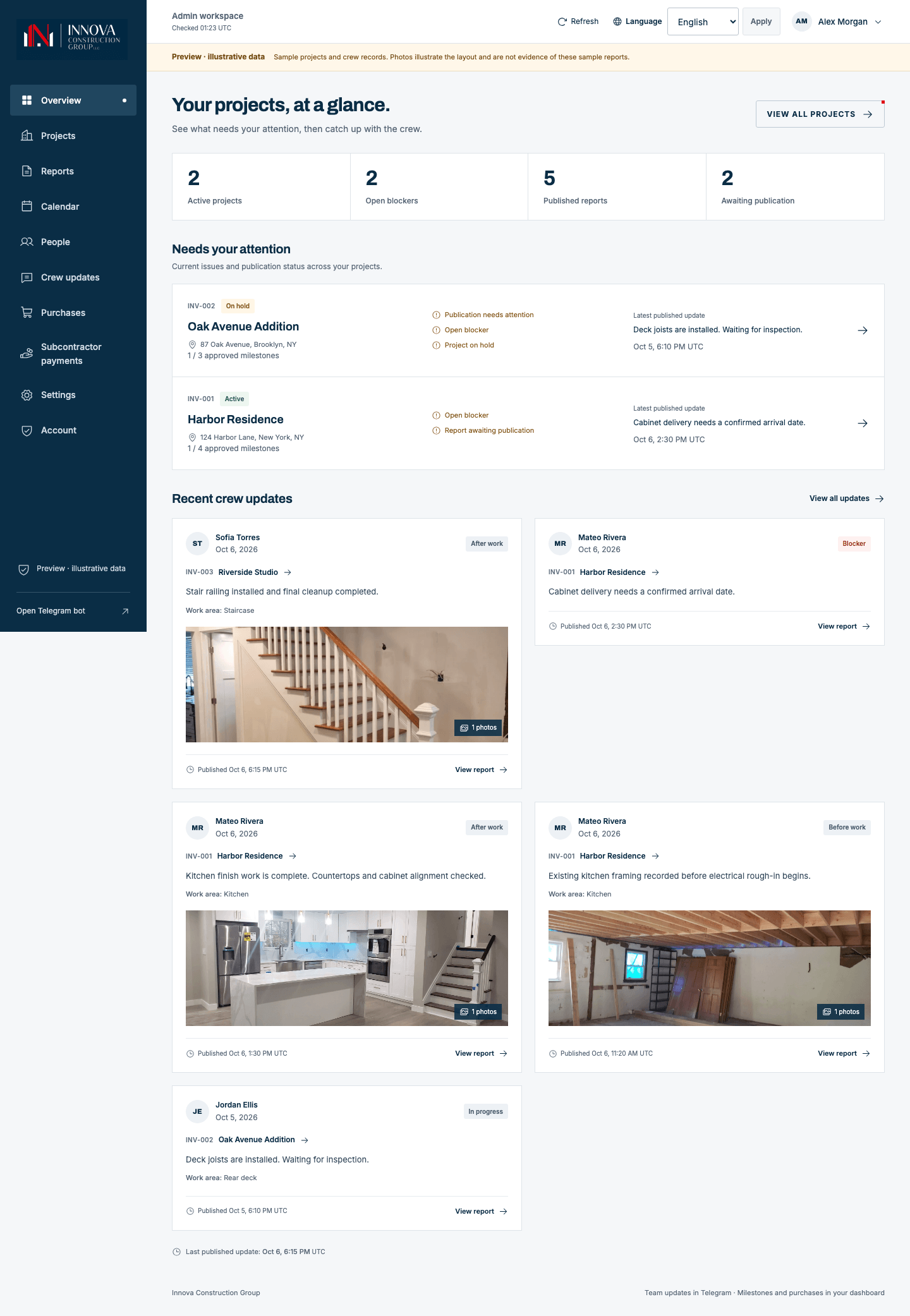
Within a project, the owner can move between updates, milestones, crew, photos, purchases and subcontractor payments. A shared cost period follows across project tabs, keeping cost comparisons on the same dates. These views retain the same project identity, so a correction to a job name does not break its history.
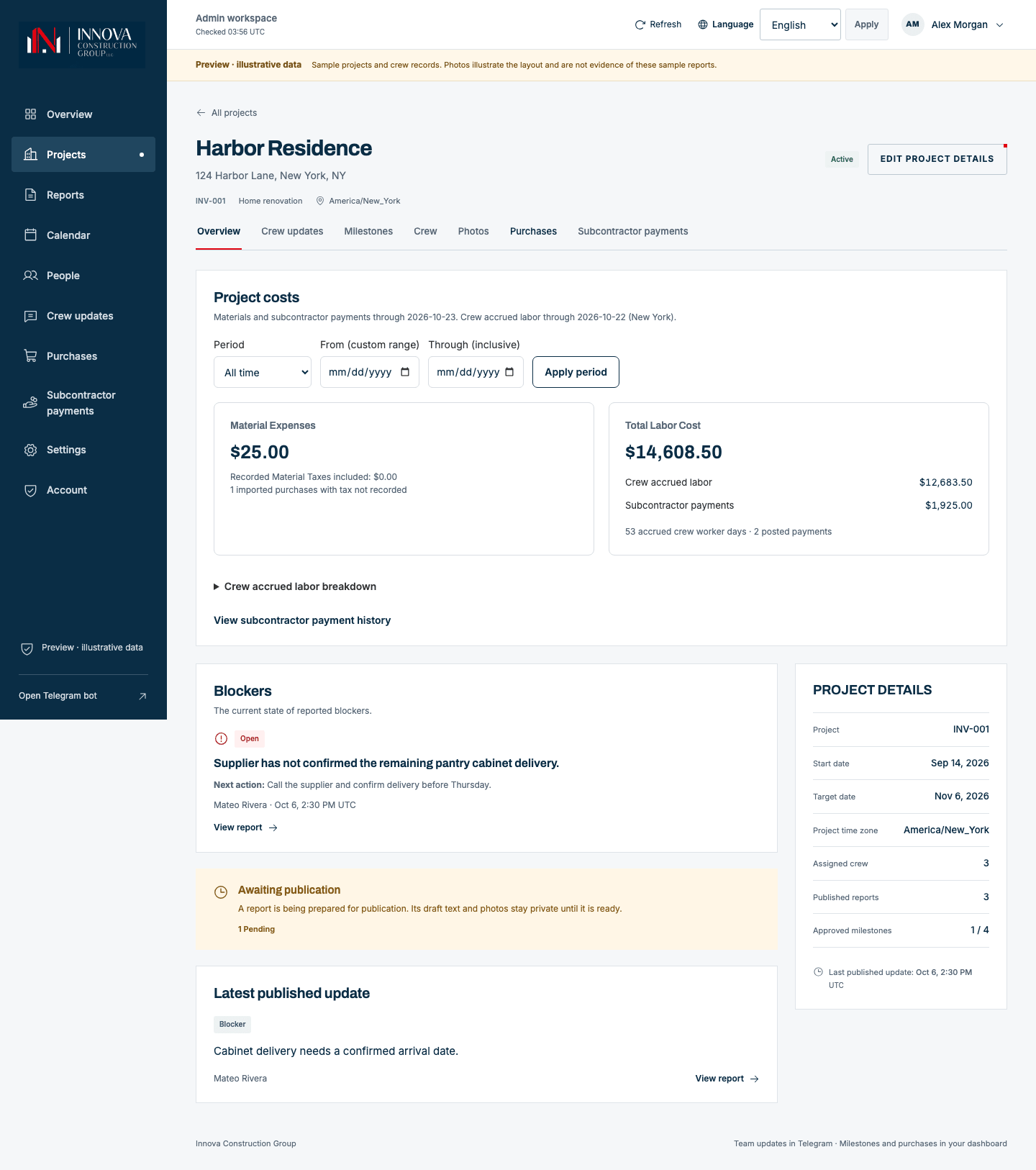
The result is a place to inspect an issue and follow it back to the work behind it.
Management reports bring selected projects, dates and sections into a fixed saved version, with PDF and CSV ZIP outputs. The live project record can continue to change while that report preserves what was captured. Saved settings help reuse a reporting setup, and emailing a report is a separate, explicit action.
MCP for AI access
The MCP connection gives an assistant a defined route into selected Innova information. Access follows the connected account and its approved permissions.
The assistant can retrieve relevant records and link a response back to Innova. It can also prepare supported operational changes for review. Connecting the assistant and approving a particular business change remain separate decisions.
Capabilities built around specific business actions
Useful AI depends on useful operations. We built the application around actions with clear inputs, permissions and outcomes.
Scroll sideways to see all columns.
| Area | What the system supports | Why it matters |
|---|---|---|
| Projects | Create jobs, preserve identity through corrections, and manage lifecycle and planning dates | Keeps the history of a job connected |
| People and calendar | Maintain worker records, assign crew to dates and projects, and review historical corrections | Relates the work plan to the appropriate people and dates |
| Field evidence | Capture published updates, photos, blockers, corrections and supplements | Makes progress inspectable |
| Milestones | Submit evidence for review, approve or request changes, and retain decision history through dashboard and Telegram workflows | Gives completion a deliberate review process |
| Purchases | Record receipt-backed expenses and refunds, import Home Depot CSV records, and assign purchases to jobs | Connects material records to project costs |
| Labor | Show accrued crew labor and recorded subcontractor payments separately | Preserves the meaning of different cost components |
| Management reports | Capture a fixed version, prepare PDF and CSV ZIP files, and reuse report settings in the dashboard | Creates a durable output from changing operational records |
| AI assistance | Read permitted project, workforce and financial context; prepare supported project, worker, calendar and import changes | Turns a conversational request into defined, reviewable work |
For a supported change through AI, the interaction continues beyond the conversation. The assistant prepares an exact proposal. The user opens Innova, reviews the values and warnings while signed in, and approves that proposal. The assistant can then commit it and check the saved result.
If the underlying record changes, the earlier proposal may need to be prepared again. The review belongs to the specific change the person inspected.
Context that preserves the meaning of the work
The context layer is the relationship between records: which person reported what, for which project and workday, with which evidence and subsequent decisions.
Several distinctions are central to the design.
A daily report marked Completed does not approve a milestone. A scheduled crew day does not independently prove attendance. A recorded subcontractor payment documents money already paid; recording it does not transfer money. An unpublished draft stays separate from published evidence.
Costs have their own dates and definitions. Materials and recorded payments can include the current day, while accrued crew labor stops before today in the business’s New York timezone. Missing amounts remain unknown, and currencies stay separate.
These details shape what an assistant should say. A useful answer needs to preserve the difference between the current state of a blocker and an older published explanation, or between work reported complete and work approved by an owner.
The system gives AI structured business context to retrieve, including source links and record state. That makes it possible to inspect the basis of an answer and identify what still needs a person’s judgment.
Cadence through scheduled AI work
Connectivity makes the records reachable. Capabilities define the work an assistant can perform. Context makes that work specific to Innova. Cadence determines when the assistant returns to it.
In this architecture, cadence comes from a scheduled AI task outside the dashboard. The task needs a runtime that can use the Innova connection, along with an agreed scope, timing and destination for its output. MCP supplies access; the external task supplies recurrence.
Illustrative routines include:
- A morning operations brief: review active projects, current blockers, dated crew assignments and recent published updates, then prepare a brief with source links.
- An end-of-day evidence review: identify scheduled workdays that need reporting follow-up, while preserving the distinction between missing evidence and attendance.
- A weekly owner review: bring together published progress, open issues, milestone review states and recorded costs for a defined period.
- An exception check: surface meaningful changes that need attention, with a clear rule for when to notify the owner.
These examples show how an external AI schedule can build on the connected foundation. The AI host provides the schedule; Innova provides the context and capabilities. The dashboard’s background processing and crew calendar have separate purposes.
A recurring task also retains the boundaries of the work it performs. Reading context and preparing a proposal do not replace the required approval for a business change.
One project across the system
Consider an illustrative kitchen installation. A team leader reports that a damaged cabinet panel prevents the last part of the job from being finished.
In Telegram, the team leader selects the correct job and work date, uses Report issue to record the problem with photos, and submits it. The bot confirms Saved after the report and required evidence are stored. Later, the team leader submits a separate final report with a Partial result.
In the dashboard, the owner can inspect that published update and the project’s blocker state, then review the separately recorded crew schedule and costs. A milestone remains subject to its own submission and approval process.
The owner can ask the connected assistant:
What is blocking this project, and which published updates explain it?
The assistant can retrieve permitted records and return an answer with links to the source. If the owner requests a supported calendar change, the assistant can prepare the exact proposal for signed-in review.
A separately configured morning AI task could revisit that same context and surface the unresolved issue or a meaningful change. The records remain in Innova; the scheduled task determines when to review them.
The same project context carries from field evidence to an owner decision and a verified change. Each step retains a connection to the work behind it.
What the foundation makes possible
The product connects field reporting and management around durable business records. Owners have a place to inspect work and make decisions. Crews have guided reporting workflows. Authorized AI assistants have selected context and capabilities they can use within explicit boundaries.
That is the beginning of an AI operating system for a business. Its usefulness comes from the relationship between the people, records, tools and recurring work.
For CoreUX, Innova provides a concrete example of the business AI operating system approach: build the operational foundation, connect AI to useful work, and add cadence around routines that have been defined and checked.
Start with a workflow in your business
A recurring handoff, an unanswered operational question or a report someone rebuilds every week can be the starting point. CoreUX helps connect the context, tools and actions that workflow needs, then define how it should run and where a person should review it.
Explore a business AI operating system with CoreUX